RaspberryPi SenseHAT live pressure graphs

UPDATE: Now plotting air pressure, temperature AND humidity – see end of this post!

I’ve been playing with the RaspberryPi SenseHAT to see how easy it would be to code some live data logging of environmental factors like temperature or air pressure.

The Python matplotlib library makes it easy to plot nice graphs, and you can even update them. The Python code below takes a reading from the air pressure sensor on the SenseHAT every second for 20 seconds, and writes the readings into a list called pressure_list. It also logs the air pressure readings in the console you get a live readout which may be useful later…

It also writes numbers up 20 in a list called x to give us some numbers to go on the x-axis of our graph.

When the 20 seconds are up, it plots a bar chart of the readings, zoomed in to show only air pressures between 1026.7 and 1027 millibars – this is roughly the current range of air pressures in my lounge and the plt.axis command ensures we can easily see the differences in the bar chart. I also check to see if there are any exceptionally high or low pressure readings in each 20 second cycle, and take those into account when plotting the bar chart, though this gets reset on the next pass. You may need to fiddle with values for max_pressure and min_pressure depending on the weather!

It then repeats the process, wiping the list and starting again with 20 new air pressure readings.

Plenty still to do – the graph needs axis labels, the numbers on the Y axis are meaningless, it needs a title. You could also log the data to a CSV file, timestamp it and only display the last 20 seconds, or perhaps update a daily graph, add in temperatures and humidity too, plot line graphs, scatter charts – the possibilities are endless!

import matplotlib.pyplot as plt
from time import sleep
from sense_hat import SenseHat

sense = SenseHat()
sense.clear()     # reset the senseHAT

plt.ion()         # turn on interactive plotting

while True:
    max_pressure = 1027    # may need to tweak these numbers
    min_pressure = 1026.7  # depending on the weather!
    pressure_list = []
    x = []
    for a in range(20):
        pressure = sense.get_pressure()
        print(pressure)
        pressure_list.append(pressure)
        x.append(a)
        if pressure > max_pressure:
            max_pressure = pressure
            print('new max')
        if pressure < min_pressure:
            min_pressure = pressure
            print('new min')
        sleep(1)
    plt.clf()                      # clear the chart
    plt.bar(x,pressure_list)       # make a bar chart from the data
    plt.axis([0,20,min_pressure,max_pressure])   # zoom in the Y axis
    plt.draw()                     # make the chart appear

Can you see where I blew on it then inhaled deeply?


UPDATE
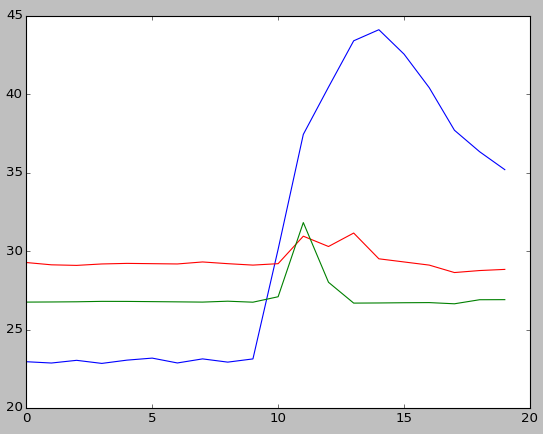
I've now tweaked the code and simplified it so it measures and plots humidity in blue, temperature in red and air pressure in green, still logging values every second for 20 seconds then updating the chart.

This program doesn't scale the Y axis according to maximum/minimum values but fudges things somewhat to get the scales right so you can see relatively small changes. It does this by subtracting 1000 from the air pressure reading and halving the humidity reading - this may not work in different weather conditions, but you can see the correlation between rise of temperature, humidity and air pressure when I blew hot, wet breath (ugh!) on the SenseHAT.

I have a few ideas where to take this project next, so watch this space...

import matplotlib.pyplot as plt
from time import sleep
from sense_hat import SenseHat

sense = SenseHat()

plt.ion()	# turn on interactive plotting

while True:
    pressure_list = []
    temp_list = []
    humidity_list = []
    x = []

    for a in range(20):

        pressure = sense.get_pressure()-1000
        pressure_list.append(pressure)

        temp = sense.get_temperature()
        temp_list.append(temp)

        humidity = sense.get_humidity()/2
        humidity_list.append(humidity)

        print(pressure, temp, humidity)

        x.append(a)

        sleep(1)

    plt.clf()
    plt.plot(x,humidity_list)
    plt.plot(x,temp_list,'r')
    plt.plot(x,pressure_list,'g')
    plt.draw()

Update to the Update!

Now with improved temperature readings and charts that grow and log data over much more time... no idea how long it'll run before crashing, though!

Here's the new code as featured in the video:

import matplotlib.pyplot as plt
from time import sleep
from sense_hat import SenseHat
import os

def getCPUtemperature():
 res = os.popen('vcgencmd measure_temp').readline()
 return(res.replace("temp=","").replace("'C\n",""))

sense = SenseHat()
plt.ion()
pressure_list = []
temp_list = []
humidity_list = []
x = []
a = 0

while True:
    pressure = sense.get_pressure()-1000
    pressure_list.append(pressure)
# attempt to calculate ambient temperature
# based on dgaust in https://www.raspberrypi.org/forums/viewtopic.php?f=104&t=111457
    cpuTemp=int(float(getCPUtemperature()))
    ambient = sense.get_temperature_from_pressure()
    calctemp = ambient - ((cpuTemp - ambient)/ 1.5)
    temp_list.append(calctemp)

    humidity = sense.get_humidity()
    humidity_list.append(humidity)

    print(pressure, calctemp, humidity)

    x.append(a)
    a = a + 1
    sleep(1)

    if a / 10 == int(a/10):
        plt.clf()
        plt.plot(x,humidity_list)
        plt.plot(x,temp_list,'r')
        plt.plot(x,pressure_list,'g')
        plt.draw()
Posted in Raspberry Pi | Tagged , | 5 Comments

Simple radio data communication using BBC micro:bits

The excellent Python Mu editor makes it a doddle to get micro:bits talking to each other wirelessly – check out the awesome firefly project on this page.

I thought I’d have a go myself, and in no time at all turned 3 Microbits into little glowing, wirelessly-communicating bugs.

Next I had a go at writing some code of my own, first just to send ‘A’ and ‘B’ button presses between micro:bits:

import radio
from microbit import display, button_a, button_b

radio.on()

while True:
    # Buttons send letters
    if button_a.was_pressed():
        radio.send('A')
    if button_b.was_pressed():
        radio.send('B')
    # Read incoming messages
    incoming = radio.receive()
    if incoming == 'A':
        display.show('A')
    if incoming == 'B':
        display.show('B')

Then I had a go at sending Morse code – here the A button sends dots, the B button sends dashes. There’s a bit of a delay (300 milliseconds) before the screen blanks so you can see discrete dots and dashes. Next step is to mash this up with a wired morse code project so it will automatically decode messages and display them!

import radio
from microbit import display, button_a, button_b, sleep

radio.on()

while True:
    # Buttons sends a message.
    if button_a.was_pressed():
        display.show('.')
        radio.send('.')
    if button_b.was_pressed():
        display.show('-')
        radio.send('-')
    # Read any incoming messages.
    incoming = radio.receive()
    if incoming == '.':
        display.show('.')
    if incoming == '-':
        display.show('-')
    sleep(300)
    display.show(' ')
Posted in computers, education, ICT | Tagged , , | Leave a comment

My Top 10 School Movies

After 22 years working in BBC radio, a few years ago I retrained as a teacher, and this morning I started to think about how teachers and schools have been portrayed in the movies over the years, and how this might have influenced my career choice. This is a very much a personal rather than definitive list – lots of classics are missing. There’s no Goodbye Mr Chips, no To Sir With Love, no Dead Poets Society, not even a Harry Potter. What else did I miss?

(Plot summaries from the City of Bristol’s best web site, IMDb)

10. The School of Rock (2003)

After being kicked out of a rock band, Dewey Finn becomes a substitute teacher of a strict elementary private school, only to try and turn it into a rock band.

(And yes apparently it did originally have The Definitive Article in its title). I actually only saw this relatively recently, being constantly nagged by my children to watch it. It didn’t disappoint, Jack Black at his feel-good best. And having worked as a supply teacher for a year, it was probably even better that I waited before watching it.

9. Sing Street (2016)

A boy growing up in Dublin during the 1980s escapes his strained family life by starting a band to impress the mysterious girl he likes.

John Carney’s beautiful, personal film about a boy trying to start a band in 1980s Dublin owes more to The School of Rock or even Son of Rambow than the possibly more obvious The Commitments. Some found the ending a bit much, but I loved it loved it loved it. Highly recommended.

8. The Belles of St Trinian’s (1954)

These schoolgirls are more interested in racing forms than books as they try to get-rich-quick.

With a cast like Alastair Sim, Joyce Grenfell and George Cole it could hardly go wrong, the latter foreshadowing his TV role as Arthur Daley by 30 years or so. This probably would have been better viewing on the eve of starting work in a girls’ school than the one I actually picked (see No.6 below).

7. Donnie Darko (2001)

A troubled teenager is plagued by visions of a large bunny rabbit that manipulates him to commit a series of crimes, after narrowly escaping a bizarre accident. (IMDb you truly are spoiling us with this synopsis).

Personally I find this film kind of funny, I find it kind of sad. Ok, not strictly a school film, but surely anyone who ever studied Eng Lit at school (and that’s all of us) had a teacher at some point who reminds you slightly of Drew Barrymore’s young rebellious teacher with her ‘cellar door’. Or perhaps you are that teacher? And frankly, sometimes I doubt your commitment to Sparkle Motion…

6. The Falling (2014)

It’s 1969 at a strict English girls’ school where charismatic Abbie and intense and troubled Lydia are best friends. After a tragedy occurs at the school, a mysterious fainting epidemic breaks out threatening the stability of all involved.

What was I thinking, watching this the night before I started working in a girls’ school? More to the point, what the hell was writer/director Carol Morley thinking with that ending? I won’t spoil it, but this extraordinarily lyrical, poetic, ambiguous film is sharply undercut with a really, really, really disturbing ending that I find… deeply troublesome. I didn’t sleep well that night. Nor much ever since.

5. The Awakening (2011)

In 1921, England is overwhelmed by the loss and grief of World War I. Hoax exposer Florence Cathcart visits a boarding school to explain sightings of a child ghost. Everything she believes unravels as the ‘missing’ begin to show themselves.

Neglected, under-rated BBC film starring Rebecca Hall, Dominic West and Imelda Staunton. Ok, I admit I will watch anything Rebecca Hall appears in, but I love this film, a cracking ghost story with a twist that I found impressive, after an oppressive, suspenseful journey. I rate it higher than the much-lauded The Falling. Literally, it’s one better.

4. The History Boys (2006)

An unruly class of gifted and charming teenage boys are taught by two eccentric and innovative teachers, as their headmaster pushes for them all to get accepted into Oxford or Cambridge.

A highly personal choice. This adaptation of Alan Bennett’s play may be a bit too stagey for the screen, but I love this because at the same time as this film is set I was doing ‘third year 6th form’, being crammed (pointlessly, as it happened) for Oxbridge by some glorious eccentrics who spookily resemble the teachers in this film. With literally the same soundtrack playing on the cassette player in the Junior Common Room. Perfectly encapsulates 3 months of my life in the 1980s.

3. An Education (2009)

A coming-of-age story about a teenage girl in 1960s suburban London, and how her life changes with the arrival of a playboy nearly twice her age.

Again, not strictly a school film, but as a sucker for a coming of age film, I love this – and I feel the title allows me to add it to this list. It’s linked in cast member Dominic Cooper to the previous film, and thematically makes a great companion piece to the next film on my list. Plus, you know, it has Carey Mulligan in her best role since Blink and it ensured that Doctor Who would never be able to afford her again.

2. The Prime of Miss Jean Brodie (1969)

A headstrong young teacher in a private school in 1930s Edinburgh ignores the curriculum and influences her impressionable 12 year old charges with her over-romanticized world view.

Maggie Smith’s performance in this superb adaptation of Muriel Spark’s novel, is surely one of the greatest screen teachers of all time, a rebel whose refusal to stick to the scheme of work has tragic consequences.

1. Heathers (1988)

In order to get out of the snobby clique that is destroying her good-girl reputation, an intelligent teen teams up with a dark sociopath in a plot to kill the cool kids.

I admit this probably isn’t a better film than No.2, but I think Heathers is under-rated and an utter (if dark) joy. I saw first saw this in the early 90s, then saw it again recently. It was a completely different film on each viewing, but each one was wonderful. Winona Ryder is cool as, It is peppered with memorable lines, and has become almost timeless by its clever invention of a fake 1980s youth slang. Do watch it. Come on! It’ll be VERY.

Posted in Uncategorized | 1 Comment

Little Box of Fip

I’ve made many Raspberry Pi internet radios in the past – here’s how to make the simplest one possible, making use of an ancient RaspberryPi 1B that was lying neglected at the back of the drawer. This one is so simple, you can’t even change channel – the only internet radio station I ever listen to is the French station fip, so this is a perfect addition to the kitchen, and I’ll wire it in to the 3.5mm audio input socket on an old iPod dock.

Here’s what you need:

  • An old Raspberry Pi with SD card, power supply, wifi dongle
  • A keyboard, HDMI cable and some wired internet – all of these only temporarily
  • A 3.5mm audio jack lead to connect to the input of an amplifier or iPod dock.

Fresh OS install

I did try updating the old version of Wheezy on the old Pi’s SD card, but I ran into all sorts of problems. Far easier to do a fresh install of Raspbian Jesse Lite – this is a small install that doesn’t have a GUI, nor any of the software installed on the desktop like LibreOffice or the dreaded leviathan that is Wolfram. It’s command line only. That’s all we need for this.

First, as there were no files I wanted on the card, I re-formatted the SD card in my MacBook using Disk Utility as a single FAT32 partition. It was an 8GB card but I am sure you could use a far smaller one. I then downloaded NOOBS Lite, unzipped and dragged the files onto the SD card, then ejected it from the MacBook and plugged it back in the Pi.

I then plugged the Pi into my TV and plugged some wired internet into the Pi’s ethernet socket, booted it up and did a network install of Raspbian Jesse Lite. When this was finished I rebooted the Pi, and ran raspi-config to do a few things:

  • enabled ssh so I can log in remotely if I need to (it won’t have a screen or keyboard)
  • forced audio output to audio jack
  • selected option to wait until has network to boot
  • renamed device ‘fip’ so I can find it on my home network easily

Install a media player and add a station

I then installed the mpc media player by typing:
sudo apt-get install mpc mpd

I then added fip as a radio station by typing:
mpc add http://audio.scdn.arkena.com/11016/fip-midfi128.mp3

(As at Feb 2020 fip is at http://icecast.radiofrance.fr/fip-midfi.mp3 and you can find addresses for BBC local, regional and national radio stations on my page here.)

Test this works by typing
mpc play 1
at the command line. You should hear the station you added from the headphone jack on the Pi. (If you add more stations they’d be mpc play 2, 3, etc.)

I then ran
alsamixer
at the command line to turn the volume up as high as it can go, and stopped the stream playing with
mpc stop

Make it play automatically at boot

I then wrote a little shell script to play the radio by typing nano radio.sh and entering the following lines:
#!/bin/bash
mpc play 1

The press ctrl-x to save and exit.

Then I typed
chmod 755 radio.sh
to make it executable. I then typed sudo nano /etc/rc.local and added this line before exit 0:
/home/pi/radio.sh

Reboot the Pi, and it should now play your internet stream as soon as it boots up.

Wifi would be useful so I unplugged the ethernet, added a USB dongle and followed the instructions here about setting up a wifi network’s SSID and password. Rebooted without wired internet – and bingo, a little box that just plays my favourite radio station. This is probably massive feature creep, but if I could add ONE button, it might be one to shut it down gracefully…

Posted in Linux, radio, Raspbian | Tagged , , | Leave a comment

Windbreaks are well Brexit

windbreak 16

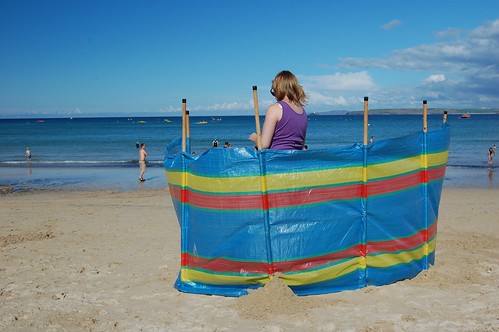
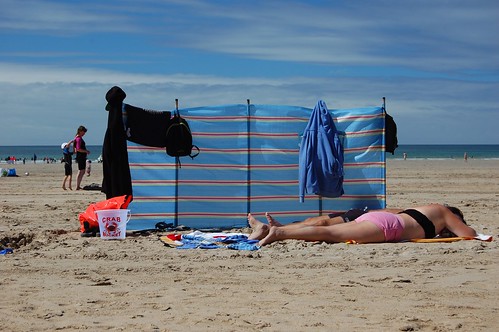
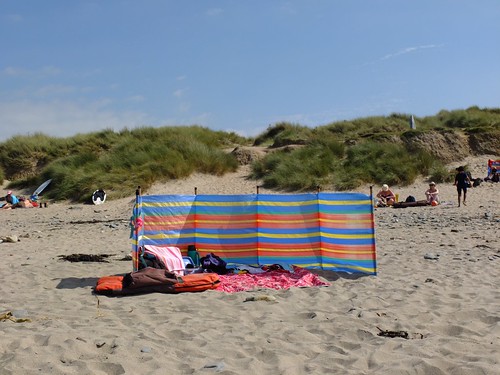
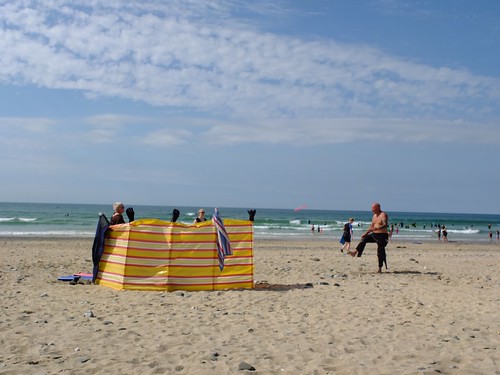
Last summer I got a bit obsessed with windbreaks and started photographing them. I liked their colour, their Britishness, the opportunity they afforded for a bit of sub-Martin Parr brightly-coloured photography.

windbreak 3

This year I see them in a slightly more jaundiced light. Yesterday I was sitting on that rarest thing – an almost windless, sunny Cornish beach. This is the same beach that Simon Armitage accurately describes in Walking Away; to walk along this beach is often to invite a sand-blasting by air that renders conversation impossible. But this day there was almost no wind at all – if anything it was too hot. And yet still the windbreaks came, each one blocking a bit more view.

DSCF8442

This year I feel as if I should have counted the windbreaks last summer and seen Brexit coming… taken account of the effort that goes in to carrying multiple windbreaks down to the sand, to construct windbreak fortresses, villages and towns in some cases as extended families enclose an area of beach that is forever off-limits to outsiders – at least until the tide comes in and forces retreat. Windbreaks are exclusive, not inclusive. They are territorial, beach land-grabs that are sometimes hilariously counter-productive: on every beach there will be at least one windbreak that has been put up to catch not protect from the wind, one that blocks the view of the sea, one that falls flat on its face.

the hokey cokey

I am possibly guilty of hypocrisy, as I must confess we usually take a 2-person pop-up tent to the beach, which clearly must also block views. But we try to site it thoughtfully, and it does at least offer protection from the sun and privacy for changing, which a windbreak is about as much use for as an ashtray on a motorbike. Or on a windy beach.

DSCF8443

Click on the image below to see the full gallery:

Windbreaks

Posted in Uncategorized | Tagged , | Leave a comment